
You can use a location or its corresponding business entity (such as a corporation) as the billing provider for claims that are submitted to carriers for procedures performed at that location.
To set up your location or entity as a billing provider
How to get to there
-
If you are not already viewing the correct location, select it from the Location menu.
-
From the Settings menu, under Location, clicktap Location Information.
The Location Information page displays.
How to get to there
-
If you are not already viewing the correct location, select it from the Location menu.
-
From the Settings menu, under Production, clicktap Insurance Claim Defaults.
The Insurance Claim Defaults page displays.
-
Update the location information:
-
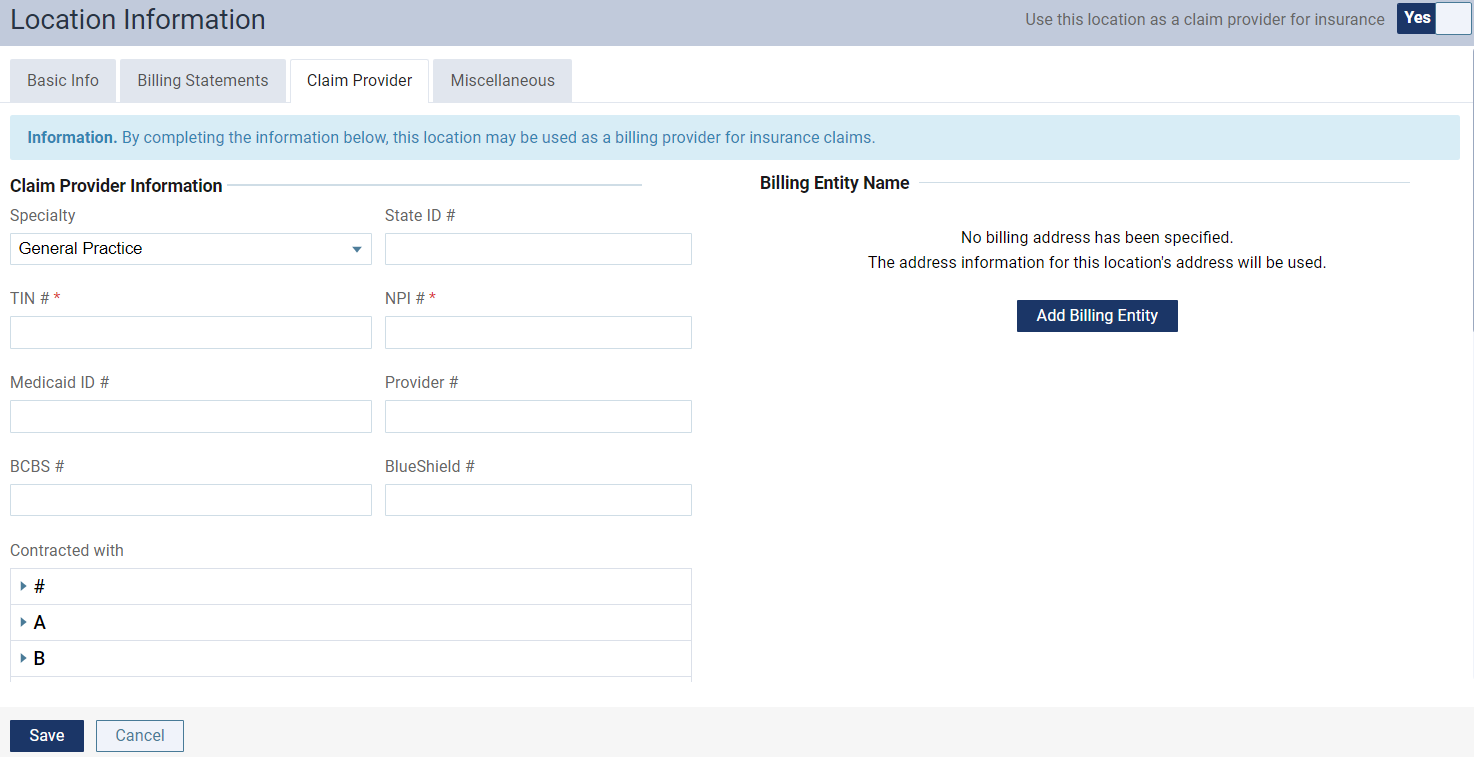
On a location's Location Information page, set the Use this location as a claim provider for insurance toggle to Yes.

-
ClickTap the Claim Provider tab.
-
Set the following options:
-
Specialty - The type of dentistry or specialty practiced at the location, such as General Practice, Endodontics, or Pediatric Dentistry.
-
IDs - The State ID (state license number), TIN # (or SSN), NPI # (for electronic claims), Medicaid ID #, Provider #, BCBS # (Blue Cross/Blue Shield number), and BlueShield #.
-
Contracted With - As needed, expand the sections (for example, A, D, and P) to view insurance carriers with names that start with those letters or numbers, and select the check boxes of the insurance carriers that this provider has a contract with to bill procedures.
Important: Each time you add an insurance carrier to your organization's database, for all users and locations who are providers, you must return to this Contracted With section and manually specify that those providers and locations are contracted with that carrier.
-
-
To set up a business entity (such as a corporation) as a billing provider for services rendered at this location, clicktap Add Billing Entity and enter the name, address, and phone number of the entity.
Note: To remove the entity, clicktap the Use location info address link.
-
ClickTap Save.
-
-
Set the insurance claim default:
-
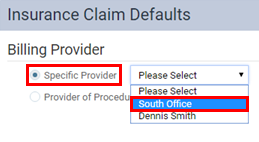
On a location's Insurance Claim Defaults page, under Billing Provider, select Specific Provider, and select the location name.
-
ClickTap Save.
-
Comments
0 comments
Please sign in to leave a comment.